You do not need an app to experiment with better medication reminders. A strip of paper or a screen with a QR code can hand the job to the patient’s own calendar, and I learned that while building a tool for Nova Pharmacy.
The short version
- Staff create a schedule in a simple form.
- The form generates a QR code for a link containing the schedule.
- The patient scans the code and adds a reminder to a phone calendar.
- The application stores no patient account or medication record.
The problem
A patient can leave the pharmacy with clear instructions and still lose the routine a few days later. I wanted to test a narrow idea: could the pharmacy hand over a reminder that fits into tools the patient already uses, without asking them to install another app or create another account?
This is a technical prototype, not a dosing recommendation. It does not choose a medication, interpret a prescription, or replace counseling from a pharmacist or prescriber.
The constraint: no account, no database
I deliberately kept the system stateless. The schedule is encoded in a short URL and the QR code points to that URL. If a slip is lost, staff can print another one. If the instructions change, staff generate a new code. There is no patient dashboard to secure and no medication database to maintain.
That does not mean the URL is magic or automatically private. A real deployment still needs sensible logging, transport security, and a careful decision about which details belong in a link. This prototype keeps the medication name out of the schedule and stores no patient identity.
Why iCalendar was the right substrate
Apple Calendar, Google Calendar, and Outlook all understand iCalendar, or .ics. That standard can represent the useful parts of a schedule:
- Daily repetition with
RRULE:FREQ=DAILY. - A reminder using a
VALARMinside the event. - Multiple daily doses as separate events at separate times.
The flow
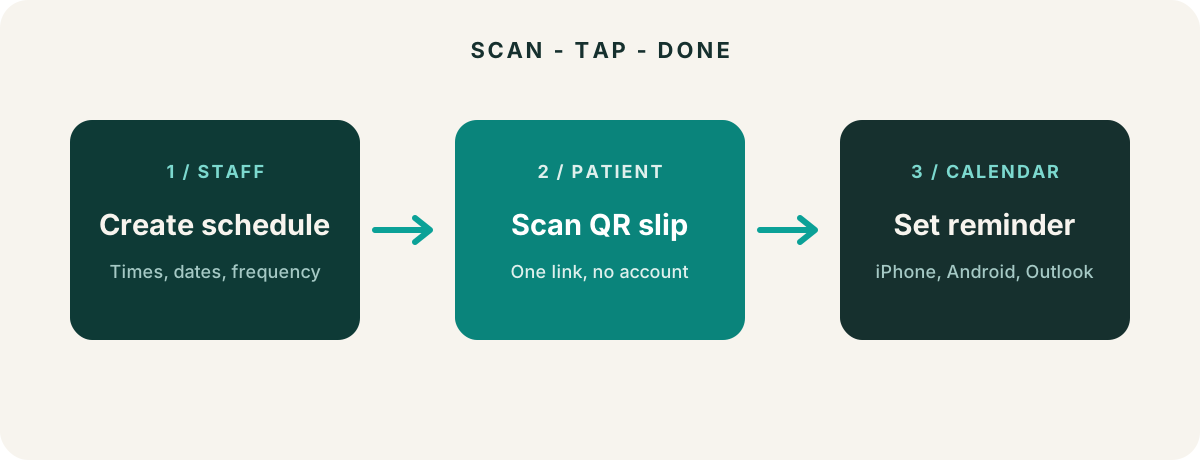
- Staff page: choose the frequency, times, start date, and end condition. The QR code updates as the form changes.
- Patient page: scan the code and see a plain-language summary with one clear action.
- Calendar endpoint: generate an
.icsfile that the phone can import.
The project is available through Nova Pharmacy. The staff form creates the schedule, while the patient link handles the platform-specific calendar behavior. If people are interested, I could talk more about how i set up the QR code generation but I felt including that write up here was a bit too technical to explain and ruined the overall flow of the write-up.
The platform details
On iPhone, opening the calendar file can bring up the native Add Event flow. On Android, a Google Calendar prefill link is convenient for one event. For multi-dose schedules, the .ics path is safer because it can import the complete set rather than silently creating only one event.
Bugs that taught me things
- A CSS rule overrode the browser’s
hiddenattribute and created empty button bars. - Google’s prefill flow could represent only one event, which was wrong for multi-dose schedules.
- Testing with jsdom caught most interaction and URL bugs, but real devices are still necessary for the final calendar experience.
Use Case Scenarios for the Tool
- Antibiotic therapy management – QID vs every 6 hours
- High Adherence Index medications – Patches with weekly or biweekly application, Bisphosphonate weekly dosing, Oral Contraceptive Medication like Progestin Only Pills where dosing interval is important.
Implementation at our Pharmacy –
I notified the rest of the staff on the tool after it was created and got a lot of feedback. We added a tablet to our pickup section at the front cash where we can quickly set up the tool for patients if needed. Plan for now is not to push it to every single patient but check with patients during counseling or refills of medications listed in the use cases to see if they might benefit from a tool like this. We have had some positive responses.
I also decided to add a patient facing section at novapharmacy.ca/reminders for patient who may not have the time to go directly to the website and use the tool themselves after reading the medication instructions. There is no need for a QR code there since they could just add it to the calendar directly but writing this now, I figured I should just add a QR code to the patient facing link.
What I would do next
Project was launched successful. The next plan would be to add taper-down or up schedules for sample cases of oral corticosteroids taper or new start of SSRI therapy . I predict the issue with this after working on that a single calendar event would not be able to represent a changing taper so I would have to classify each dose reduction into phases.
I also would need a verifying page for the pharmacist to clearly see how the doses are ordered on a calendar so we can review the full schedule prior to the QR code generation. This would be on pause for now as I work on the finalizing the novapharmacy website and preparing for the new school year.
Scope and safety
This is a technical design write-up, not medical advice or instructions for taking a medication. Patients should follow the instructions from their pharmacist or prescriber. The project should never receive identifiable patient information.